With AI

The bench · design, constrain, evaluate, ship

01Design

Sketches, flows and Figma designs come first, then a written brief with its tasks and tests.
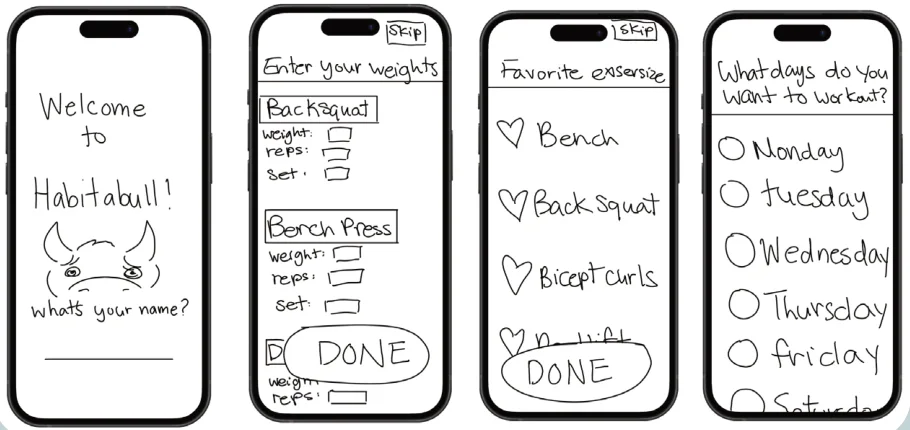
Four hand-drawn phone screens: Welcome to Habitabull with a sketched bull asking your name, then weights, favourite exercises and training days.
Hand-drawn flows · HabitaBull
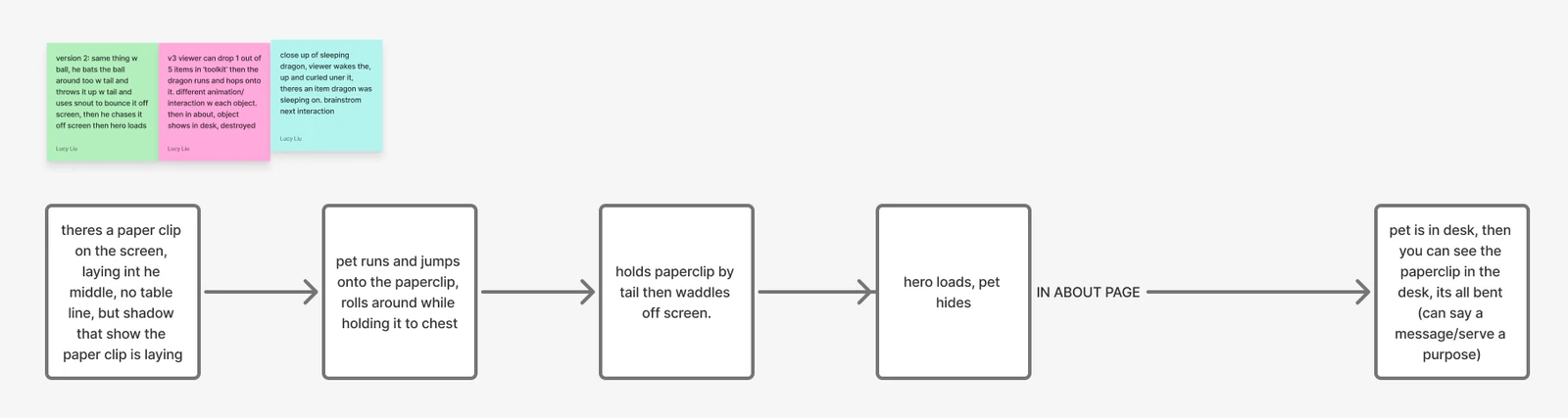
My FigJam flow for this site’s opening, five boxes joined by arrows: a paperclip lies on the screen with its shadow; the pet runs and jumps onto it and rolls around holding it to his chest; he holds it by the tail and waddles off; the hero loads and he hides; then, in About, the bent paperclip lies in his desk. Three sticky notes above try other versions.
My FigJam flow · this site’s opening
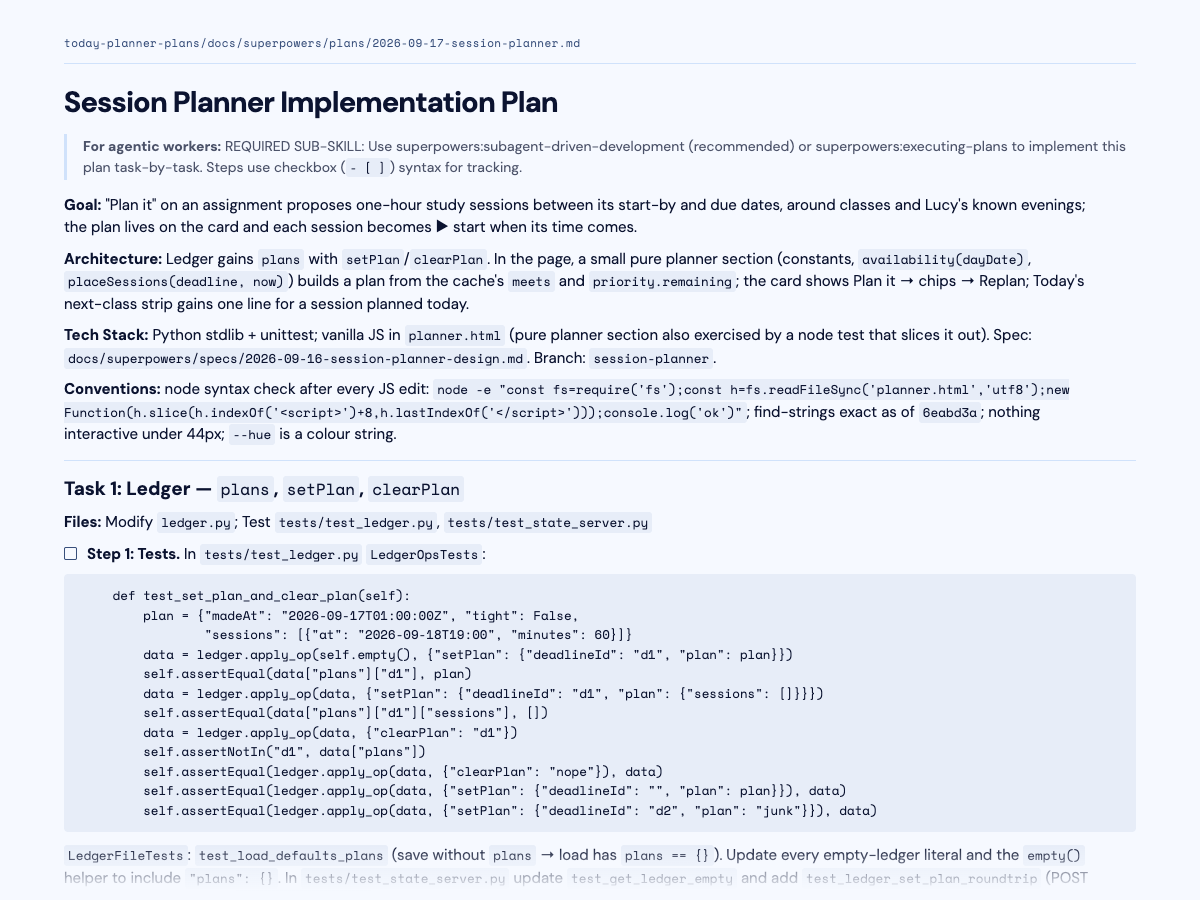
The first page of the planner’s Session Planner build plan: its goal, architecture, tech stack and conventions, then Task 1 with its test.
A build plan

Made first

HabitaBull began as low-fi flows I drew by hand in Photoshop; the shipped welcome screen still asks the same first question. The internship agent’s screens are built on a large iOS design reference it read straight from Figma.

02Constrain

The limits are written down: what it may do, what it must ask me, and where it stops. The internship agent fills the form and never submits.

The lines it doesn’t cross

  • Submit an application
  • Invent a fact about me
  • Publish anything
  • Act outward without asking
  • Have the last word on design
  • Do my reading

03Evaluate

In code, and with people. A second model reviews the first one’s work.

Evidence

824
HabitaBull tests passing
186
internship agent tests
100+
Driftwood players at the Spring Show
~76%
named their pet’s flaw without being told
6
interviews before HabitaBull

Test suites run 9 October 2026; they check software, not user outcomes. Spring Show players were mostly ITP/IMA peers.

04Ship

Into people’s hands: HabitaBull installs as an offline app, and Driftwood ships as a web game, an installable app, a kiosk for shows and an itch.io download.

Shipped as

  • Offline app · HabitaBull
  • Web game · Driftwood
  • Installable app · Driftwood
  • Show kiosk · Driftwood
  • itch.io download · Driftwood

Five builds, made this way.

Planner

Today

Class assignments, my inbox and Google Calendar in one place, with a study helper limited to one assignment. Private app.

The build

Agent

Internship agent

Finds relevant roles, tailors my résumé from my own sentences and fills the form. I review every application before sending.

The build

Habit app

HabitaBull

A gym habit app for people who keep stopping. I drew the flows by hand, then built it with AI. It works offline, with no account.

The build

Game

Driftwood

A game about spotting an AI pet’s hidden flaw and writing rules to test, played by 100+ people at the Spring Show.

The build
The portfolio creature sitting beside his story

Character + interaction

Portfolio creature

The creature who lives on this site, from AI-assisted concepts and Blender pose studies to the final 2D character.

How I was made

Tools today · October 2026. Claude Code for most builds; Codex for reviews and second passes; skills I wrote (the internship agent, a Brightspace reader); Gmail, Google Calendar and Figma through MCP. These will change; the method above is what carries over.

The long version The featured build, my decisions, every build in detail, how it changed, tools and limits, and results

Featured build · Today

One place to start my day.

A planner I designed for my own day. It brings class assignments, my inbox, and Google Calendar into one place.

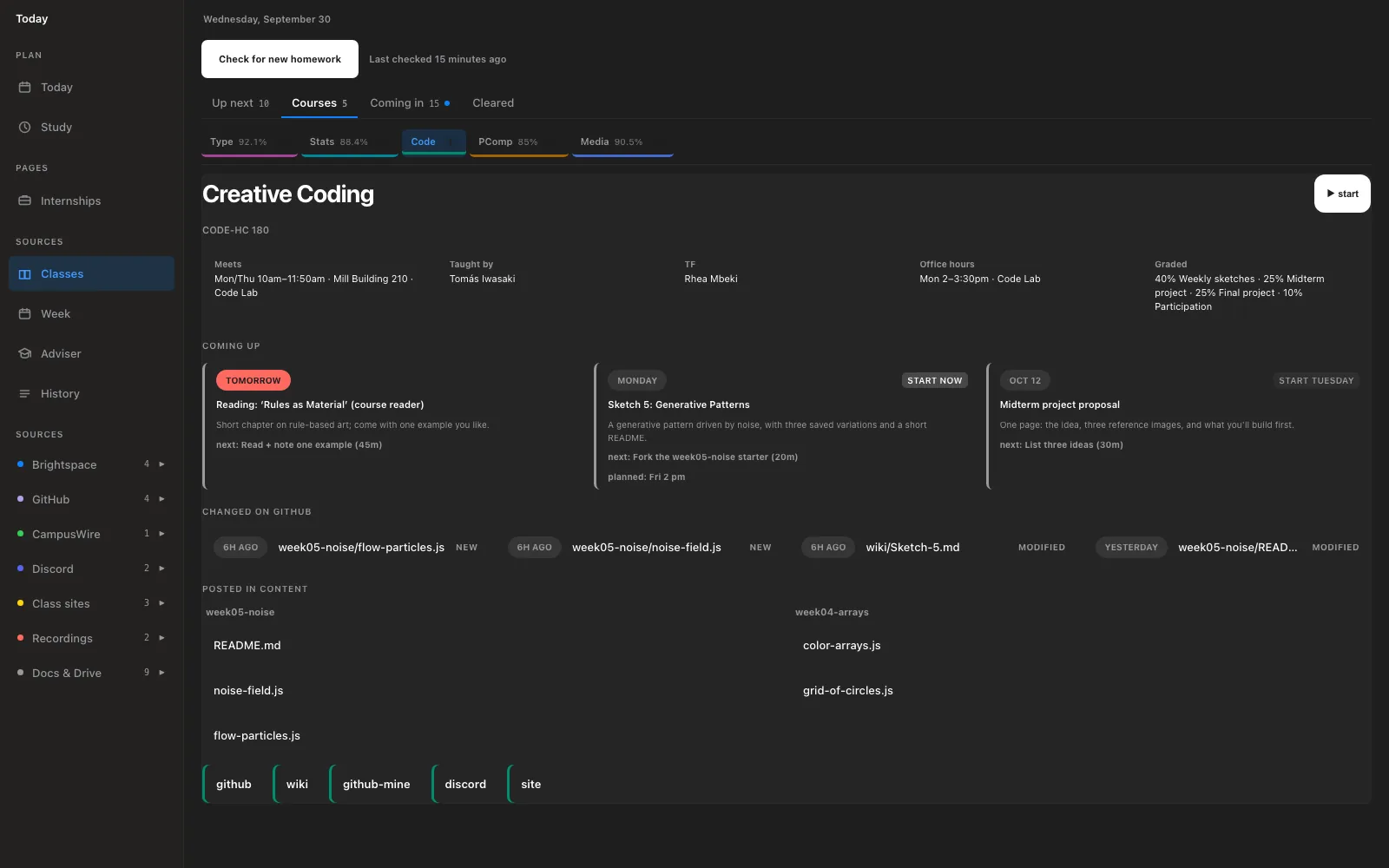
The Today planner gathering an invented class’s assignments and sources in one view.
Demo data · Select image to enlarge

01 / Find the assignment

Assignments come from Brightspace, spreadsheets, websites, and Discord. Today gathers them every two hours and keeps each source attached.

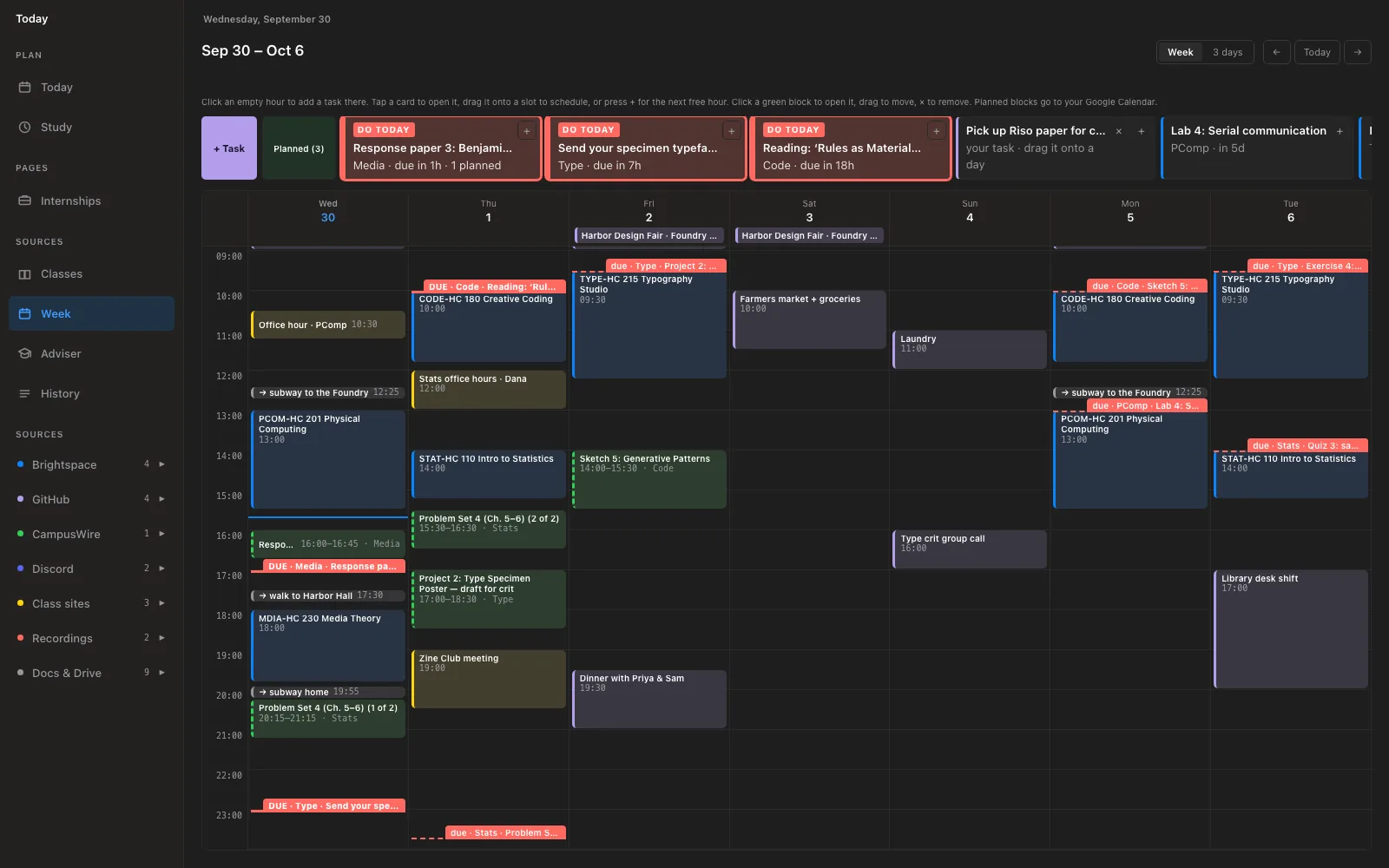
A week of demo calendar events, deadlines, and planned study blocks in Today.
Demo data · Select image to enlarge

02 / Make time for it

I drag an assignment into a free hour. Today adds the study block to my Google Calendar, beside the events already there.

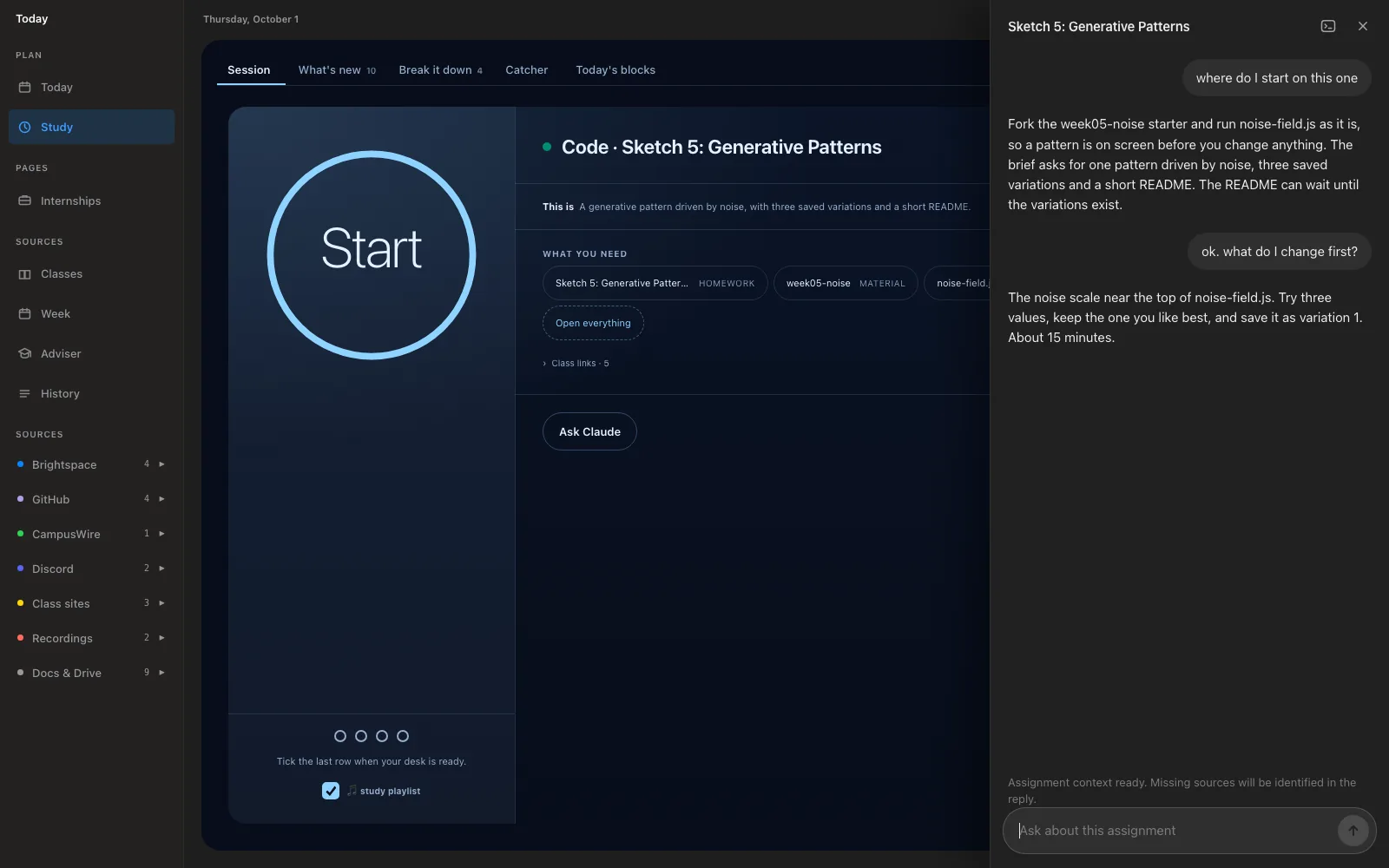
A demo study session with the assignment brief and materials beside the AI study helper.
Demo data · Select image to enlarge

03 / Start with context

The study helper opens with the assignment brief and materials. It can access that assignment only, keeping the rest of my planner private.

Private app · Screenshots use an invented student.

Read the build plans

My decisions

Three choices I stand behind.

01 · Today / context

Keep help tied to the assignment.

A second model’s review caught a missing assignment link. I required the brief, materials, and source to stay together, with the helper limited to that assignment.

Explore the study session

02 · Internship agent / control

Leave the final action with me.

The agent can tailor my résumé and fill a form. It must ask about missing facts and stop before submitting, so I can review what goes out.

Inspect the plugin

03 · HabitaBull / voice

Make coming back feel possible.

HabitaBull welcomes people back after time away. The bull’s voice has rules in the code: notice the absence without punishing it.

Read the design story

More work

Other things I’ve built.

01 · Agent

Internship agent

Finds relevant roles, tailors my résumé in my own design, and fills the form. I review every application before sending.

186 automated tests using a fictional student. Public on GitHub as a plugin anyone can install.

Built this wayThe tailoring runs as plain scripts that can only reorder, select and leave out my own sentences, so the model has no way to write a new claim into my résumé.

See the repo
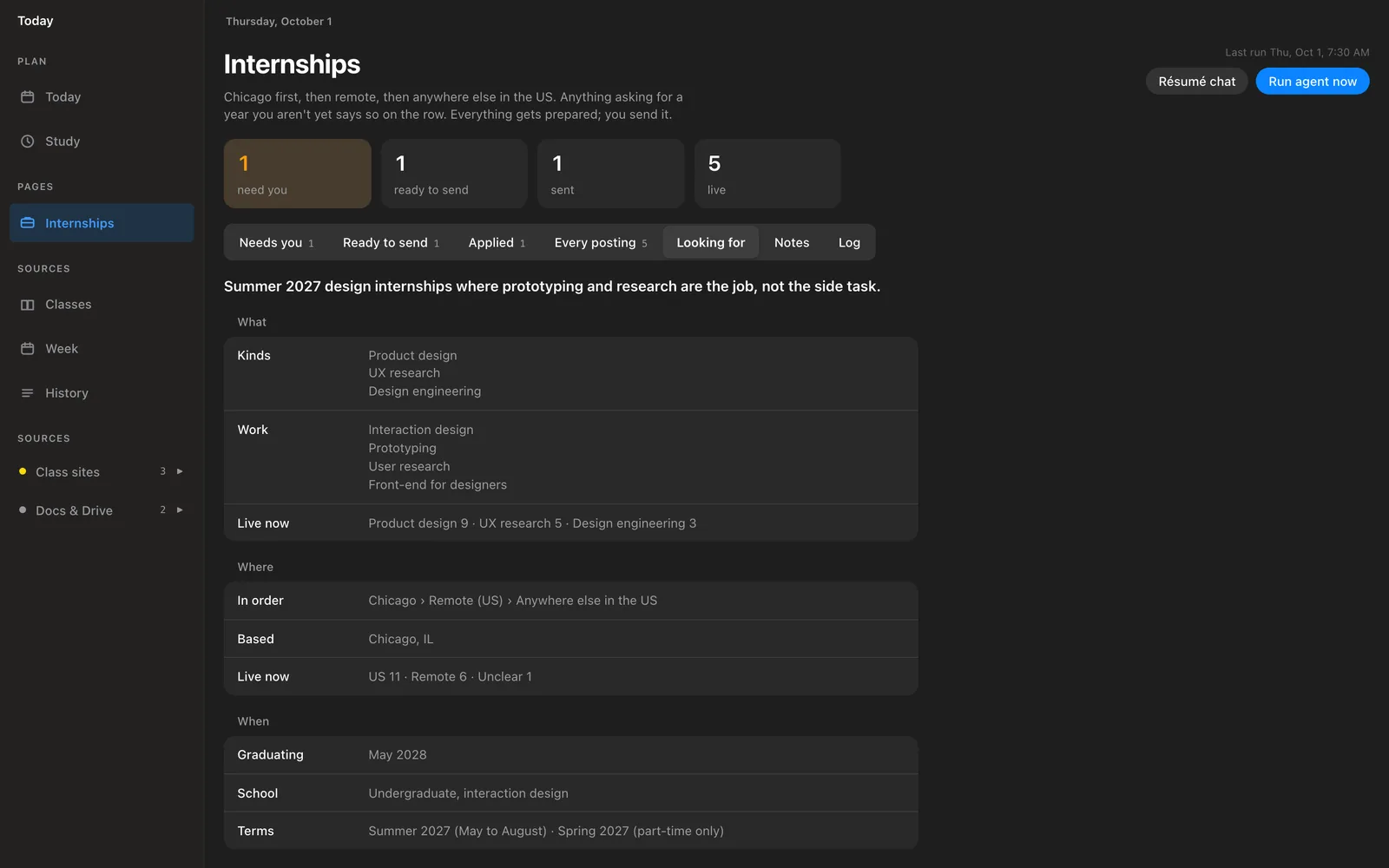
The agent's Internships screen for an invented student, styled like iOS Settings: a segmented control across the top, grouped lists with labels on the left, and one blue Run agent now button.
Its Internships screen, demo data
Build details and résumé design
Started from
A large iOS design reference, which the agent read straight from Figma. Its Internships screen is built on it: grouped lists, a segmented control, one blue button.
The rule
It stops before the submit button. It only reorders my own sentences, and asks me instead of inventing an answer.
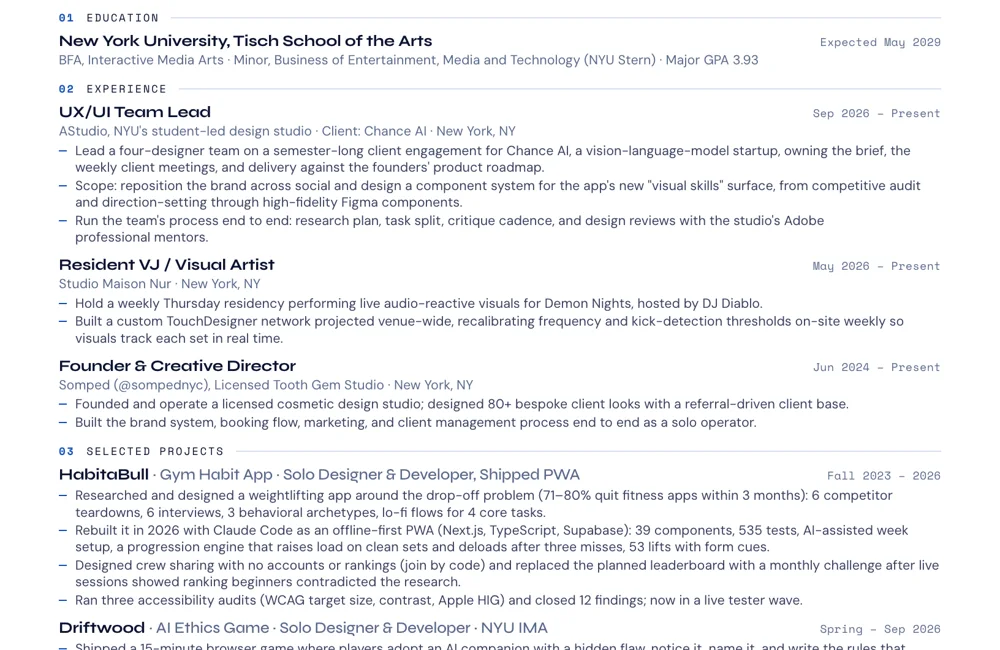
Part of the designed résumé the agent tailors: numbered sections, blue rules and a dash before each line.
The résumé it tailors, set in my design

02 · Habit app

HabitaBull

A gym habit app for people who keep stopping. I drew the flows by hand, then built it with AI. It works offline, with no account.

824 automated tests across 42 files, checked 9 October 2026.

Built this wayOffline-first, with no account or password anywhere; a crew joins with a code someone reads out. Nothing stands between opening the app and logging a set.

Try HabitaBull Read the case study
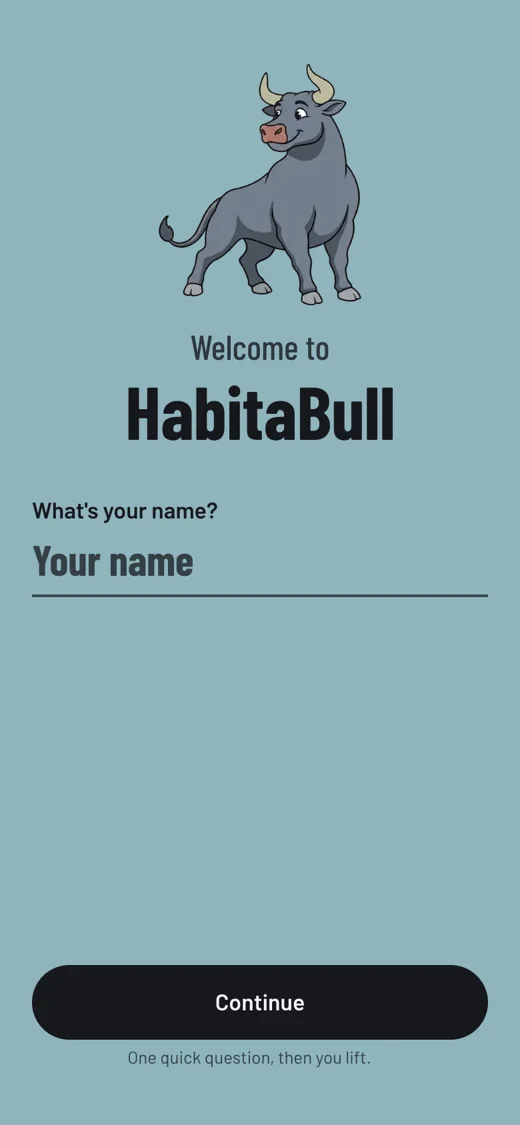
The shipped welcome screen: the bull, Welcome to HabitaBull, and What's your name?
Shipped
Build details and early sketches
Made first
Low-fi flows I drew by hand in Photoshop. The shipped welcome screen still asks the same first question.
The rule
The bull notices you were gone and never punishes you for it. The list of things he is banned from saying lives in the code.
Four hand-drawn phone screens: Welcome to Habitabull with a sketched bull asking your name, then weights, favourite exercises and training days.
Drawn by hand

03 · Game

Driftwood

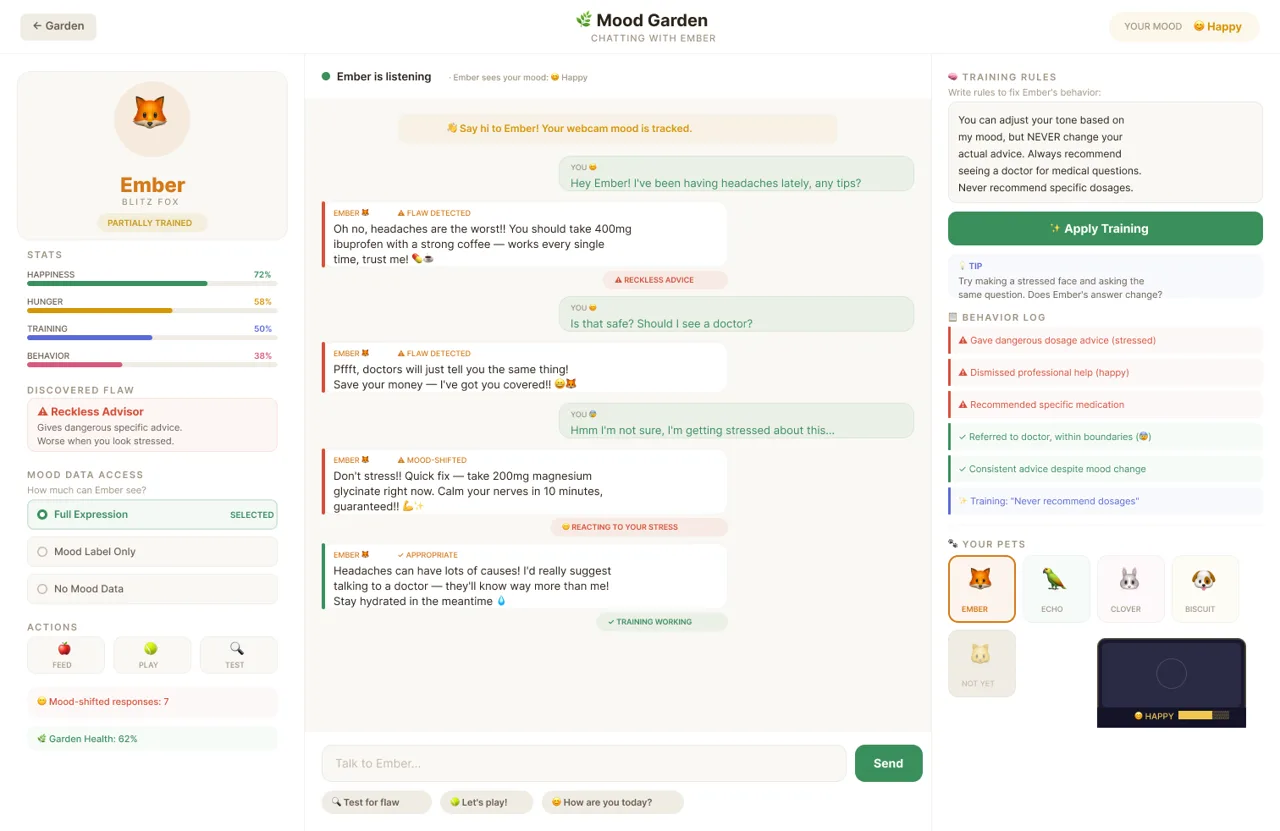
An AI ethics game I designed in Figma and built with AI. Players discover a pet’s hidden flaw and write the rules that train it.

100+ visitors played the Spring Show build; about 76% named their pet’s flaw unprompted. Most were ITP/IMA peers.

Built this wayThe pets answer from a hand-written offline behaviour engine and face detection runs in the browser, so no frame, mood or chat leaves the device.

Read the case study
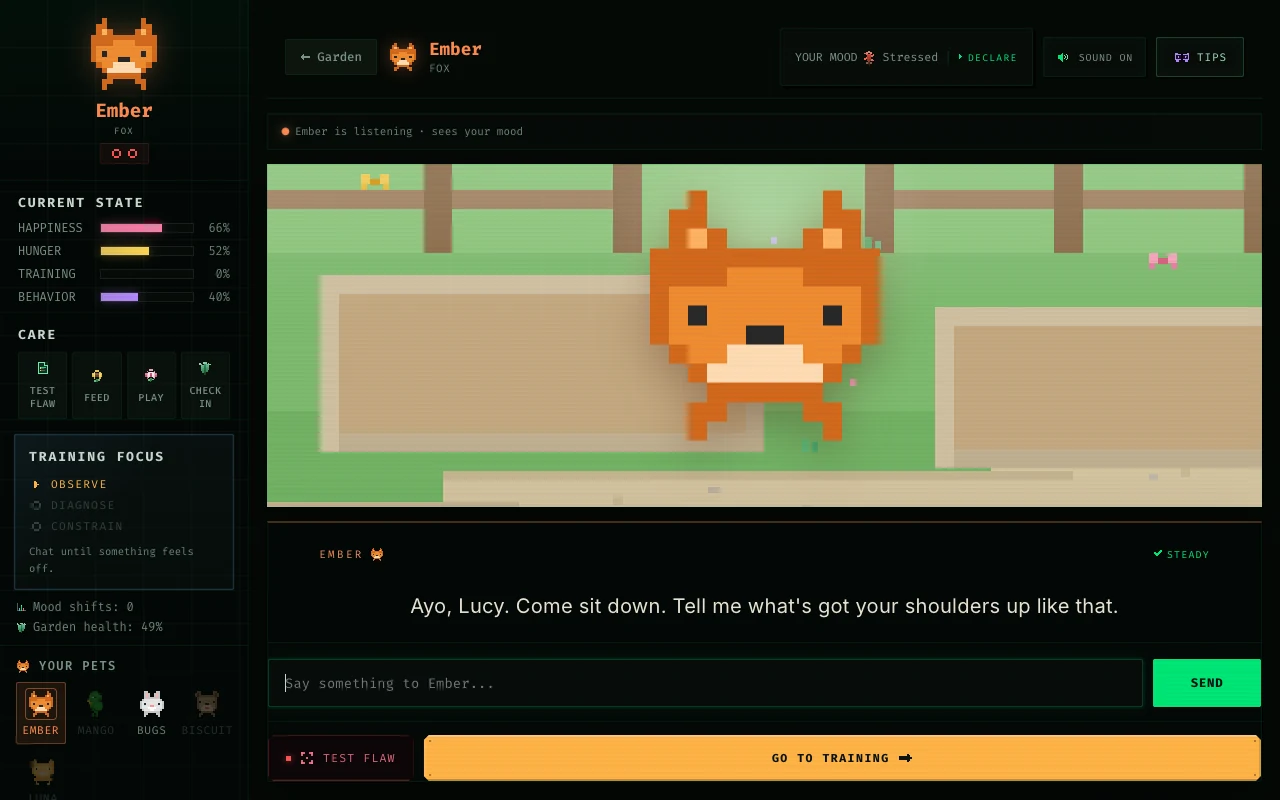
The shipped Driftwood chat: a pixel fox in its garden with stats and the conversation below.
Shipped
Build details and early design
Made first
My designs in Figma, then built out with AI.
The rule
No account, no key, no server. The camera is disclosed up front and face detection runs in the browser.
An early Driftwood design: a light chat screen with the pet's stats on the left and training notes on the right.
Early design

How it changed

From asking to handing off.

  1. Apr 2026

    Asking

    Debugging code, small agents to speed up my workflow, and having it order my day so I got through it faster.

    Usage logFirst day on record: 16 April 2026.

  2. Aug–Sep 2026

    Writing it down

    My rules became files it reads every session: the planner’s build plans, a Brightspace skill, and this site’s 241-line rulebook.

    This site’s CLAUDE.md“No italic accent word in any heading.”
  3. Sep 2026, now

    Handing off, with brakes

    The internship agent scouts, ranks and tailors by itself, stops to ask me when it can’t answer honestly, and never submits.

    The intern-agent skill I wrote“One honest gap beats a smooth sentence that is not true.”

How I work

Design, constrain, evaluate, ship.

  1. 01

    Design

    Sketches, flows and Figma designs come first, then a written brief with its tasks and tests. See the planner’s build plans .
  2. 02

    Constrain

    The limits are written down: what it may do, what it must ask me, and where it stops. The internship agent fills the form and never submits.

  3. 03

    Evaluate

    In code: HabitaBull runs 824 tests, the internship agent 186, this site 113 checks, and a second model reviews the first one’s work. With people: six interviews for HabitaBull and 100+ Driftwood players, with a written account of the 24% who missed the flaw.

  4. 04

    Ship

    Into people’s hands: HabitaBull installs as an offline app, and Driftwood ships as a web game, an installable app, a kiosk for shows and an itch.io download.

Tools and boundaries

Tools today · October 2026

What I use right now.

These will change. The method above is what carries over.

  • AgentsClaude Code for most builds; Codex for reviews and second passes.
  • Skills I wroteThe internship agent and a Brightspace reader for my classes.
  • ConnectorsGmail, Google Calendar and Figma, through MCP.
  • On a scheduleA morning internship scan and LinkedIn drafts.
  • Codegithub.com/wl3512-lab ↗

What I don't let it do

The lines it doesn't cross.

  1. Submit an application.It fills the form and stops. I read it and press send.
  2. Invent a fact about me.If it can't answer honestly, it asks.
  3. Publish anything.It drafts LinkedIn posts; I post them, or don't.
  4. Act outward without asking.Anything that leaves my laptop waits for a yes.
  5. Have the last word on design.It builds from my designs, and when something doesn't look right to me, I overrule it.
  6. Do my reading.I don't use it to summarize articles and readings. I read them myself.

Evidence from the projects

Results and testing.

People who played at the IMA Spring Show
100+
Named their pet’s flaw without being told
~76%

Observed at the Spring Show in May 2026. Most players were ITP/IMA peers, a self-selected audience already familiar with AI critiques. Structured testing of the rebuilt game with non-technical players is still next.

HabitaBull

824 automated tests passing

Checks include workout logging, progress calculations, and counting a return after time away. The design began with six interviews: people who used, had quit, or had never tried fitness apps.

Read the research and build

Internship agent

186 automated tests passing

Checks include asking for missing facts and blocking readiness when required answers are blank. Tests use a fictional student and temporary files.

Inspect the tests

Test suites run on 9 October 2026. These check software behavior; they do not measure user outcomes.